Reporting Services Console Application - Service Unavailable
Problem
You may encounter the following error when executing commands connecting to SQL Server Reporting Services:
Open iT Analysis Server, 9.6.46. Copyright 2013 Open iT, Inc. All rights reserved. http://www.openit.com
Web Service URL: http://localhost/ReportServer/ReportService2005.asmx

2021-02-24 14:59:24,148 INFO Actions - Setting Web Service URL.
2021-02-24 14:59:24,182 INFO ReportingServices - Web Service URL has been updated to http://win-host01/ReportServer/ReportService2005.asmx
2021-02-24 14:59:24,193 INFO ReportingServices - Configuring Reporting Services Policies.
2021-02-24 14:59:25,271 WARN ReportingServices - The request failed with HTTP status 503: Service Unavailable.
2021-02-24 14:59:25,273 WARN ReportingServices - The request failed with HTTP status 503: Service Unavailable.
2021-02-24 14:59:25,277 WARN ReportingServices - The request failed with HTTP status 503: Service Unavailable.
2021-02-24 14:59:25,278 WARN ReportingServices - The request failed with HTTP status 503: Service Unavailable.
2021-02-24 14:59:25,280 INFO ReportingServices - Setting Site Name Open iT Reporting Services
2021-02-24 14:59:25,281 INFO ReportingServices - http://win-host01/ReportServer/ReportService2005.asmx
2021-02-24 14:59:25,284 ERROR ReportingServices - The request failed with HTTP status 503: Service Unavailable.
2021-02-24 14:59:25,286 INFO ReportingServices - Creating OLAP Data Source
Resolution
Use any of the following suggestions to troubleshoot the issue.
Check SQL Server Service is Running
Follow these instructions to check if the SQL Server service is running:
-
Open Services.
-
In the list of services, look for SQL Server ([instance_name]).
-
Verify that the status of the service is Running.
-
If the service is not running, right-click the service name, then click Start.
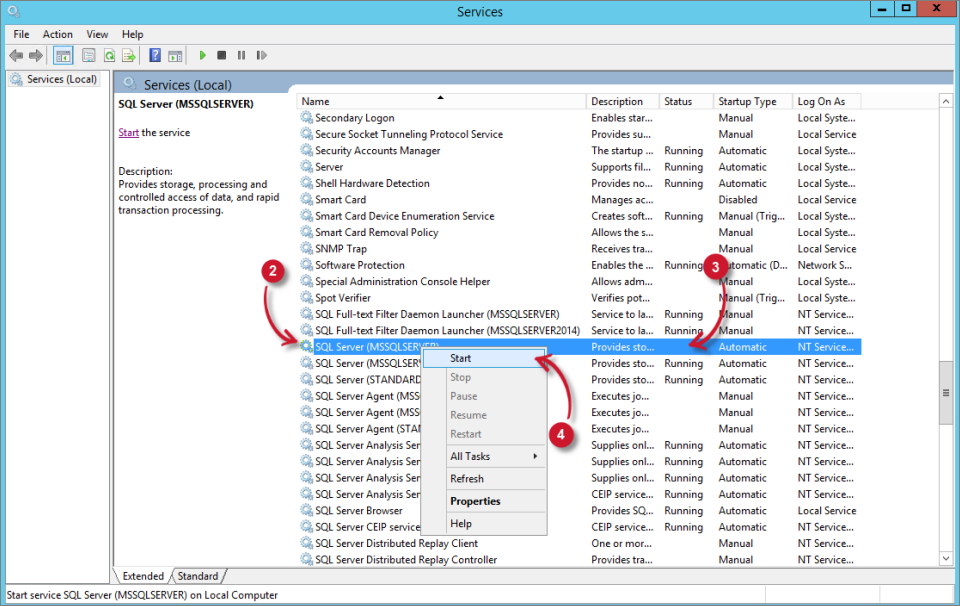 Check SQL Server Service is running
-
Wait until the service status becomes Running.
Check SQL Server Reporting Services Service is Running
Follow these instructions to check if the SQL Server Reporting Services service is running:
-
Open Services.
-
In the list of services, look for SQL Server Reporting Services ([instance_name]).
-
Verify that the status of the service is Running.
-
If the service is not running, right-click the service name, then click Start.
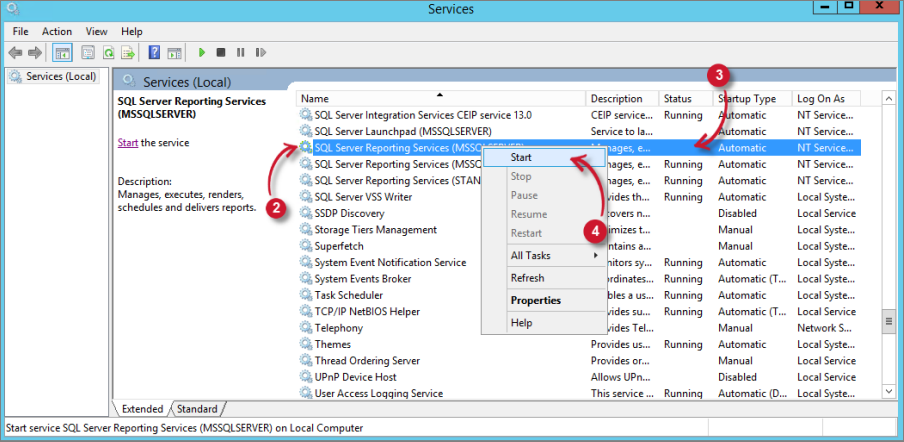 Check SQL Server Reporting Services Service is running
-
Wait until the service status becomes Running.